Flaky tests
A single run tells you what failed. A few dozen runs tell you what's unreliable — and that's a different, more expensive problem. This page covers what Piwi computes for one project once it has some history: flaky scoring, regression signals, performance trends, and spec health.
For the same signals aggregated across every project, see Analytics.
Flaky test detection
A test is flaky when its result isn't deterministic. Piwi computes a composite flakiness score per test from three signals:
- Retry passes — failed on the first attempt, passed on retry.
- Status alternation — flips between pass and fail across runs.
- Failure rate — overall proportion of failures.
Each project has a dedicated Flaky tests tab with a configurable lookback window so you can focus on recent behavior or a longer baseline.
Per-environment scoping — select a single environment in the project's environment filter and the flaky analysis is scoped to runs from that environment, so you can compare stability across staging, production, and development instead of blending them. (Set the environment via the reporter's environment option / PIWI_ENVIRONMENT; see the reporter docs.)

Root-cause classification
Every flaky test is automatically tagged with one of five categories, using keyword and distribution heuristics over its errors, steps, and browser spread:
| Category | Typical signals |
|---|---|
timing | Timeouts, "to be visible", waitFor, element-not-found-within |
network | net:: / ERR_ errors, 5xx responses, ECONNREFUSED, waitForResponse |
assertion | expect(...), "Expected:", snapshot/screenshot comparison — with no timing/network noise |
environment | Fails repeatedly on exactly one browser while others pass |
other | No clear signal |
Filter the flaky table by category to triage a class of failures at once.
Impact ranking
Not all flaky tests are equally expensive. Piwi ranks them by impact — derived from wasted CI minutes (retries × average failed duration) and pipeline-block effect — so you fix the ones that hurt most first. A color-coded dot makes it scannable:
- 🟢 green — under 5 wasted minutes
- 🟡 amber — under 30 minutes
- 🔴 red — 30 minutes or more
Per-test stability trend
Each test case has a stability trend: a time series of pass rate, flaky rate, and average duration, bucketed over time — so you can see whether a fix actually stuck.
Run insights
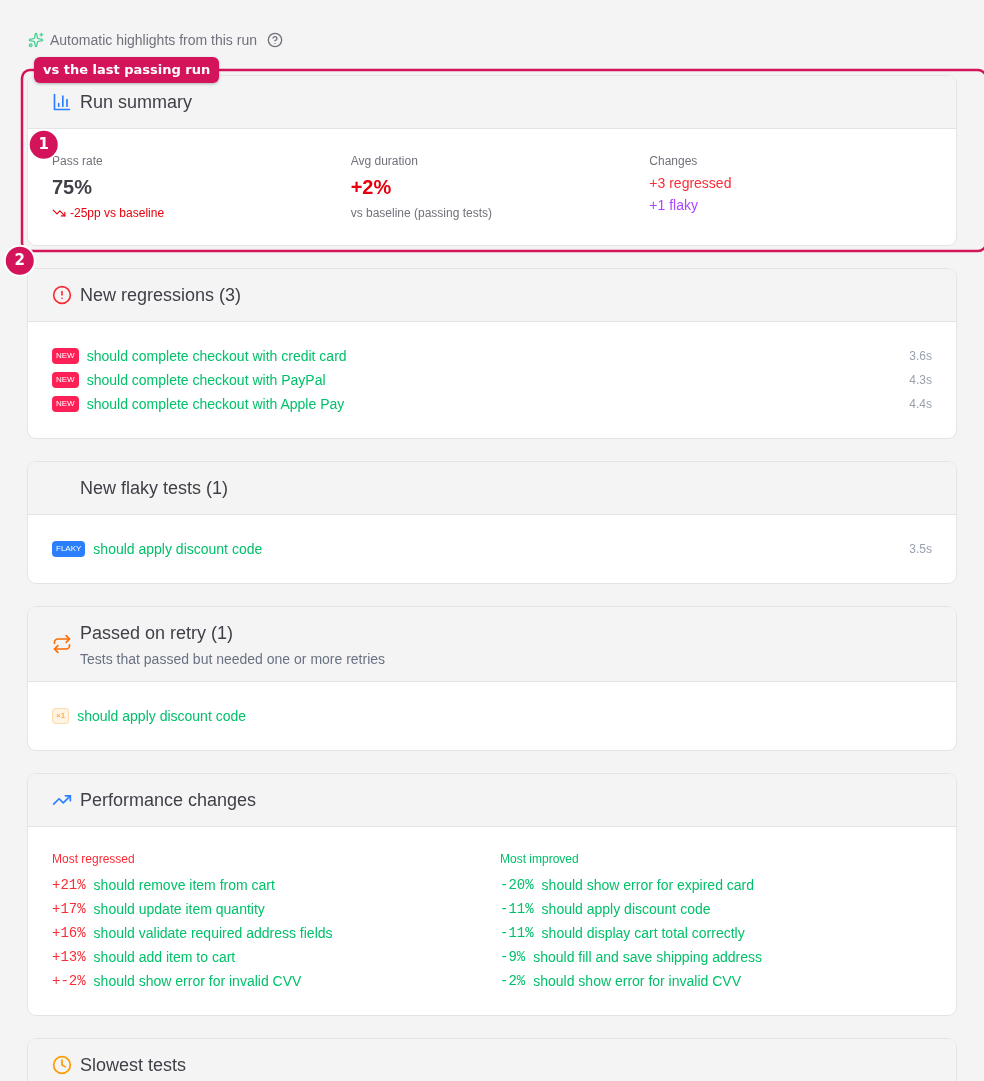
The Insights tab on a run compares it against its last passing baseline and surfaces what changed:
- New regressions — tests that newly started failing
- Recurring failures — failing again
- Fixed — previously failing, now passing
- New flaky — newly flaky tests
- Performance changes — most regressed / most improved
- Worker imbalance — uneven load across workers
- New failure clusters
Quarantine, with a way out
Detecting a flaky test doesn't stop it blocking merges. Quarantine does — without hiding it.
The usual approach is --grep-invert @quarantine: the test stops running, so nothing ever proves it's fixed, and the list only grows. A year later nobody remembers why half of it is there.
A quarantined test in Piwi keeps running and keeps reporting. It is excluded from the CI gate's verdict and nothing else. That single difference is what makes the exit possible:
- Passing runs after quarantine accumulate as a streak, and one failure resets it.
- After five consecutive passes the test is flagged ready to release — the dashboard tells you, rather than waiting to be asked.
- Candidates are proposed from the flaky analysis, ranked by wasted CI minutes rather than flakiness score. A test that flakes constantly but finishes in 200 ms costs nothing; one that flakes weekly and burns a four-minute timeout is what actually hurts.
- Debt is reported in aggregate: how many are quarantined, how many are ready to release, how long the oldest has been in, and how many still have no passing streak at all.
The gate always states how many failures quarantine excluded — a green gate that silently ignored failures would be worthless — and --max-quarantined sets a ceiling so the list can't grow unbounded.
Manage it from the project's Quarantine tab, or over the API (GET/POST /api/projects/:id/quarantine, DELETE /api/projects/:id/quarantine/:testCaseId).
Regression signals
Individual test cases in a run carry at-a-glance badges:
NEW(red) — a new regressionFLAKY(purple) — newly flaky
Toggle filters on the run's test-case list to show only new regressions or new flaky tests.
Opening a failing execution surfaces the same signals in its Verdict card (see Test case detail): new-regression / new-flaky / passed-on-retry chips, plus how long the test has been failing and a link back to its last green run.
Performance
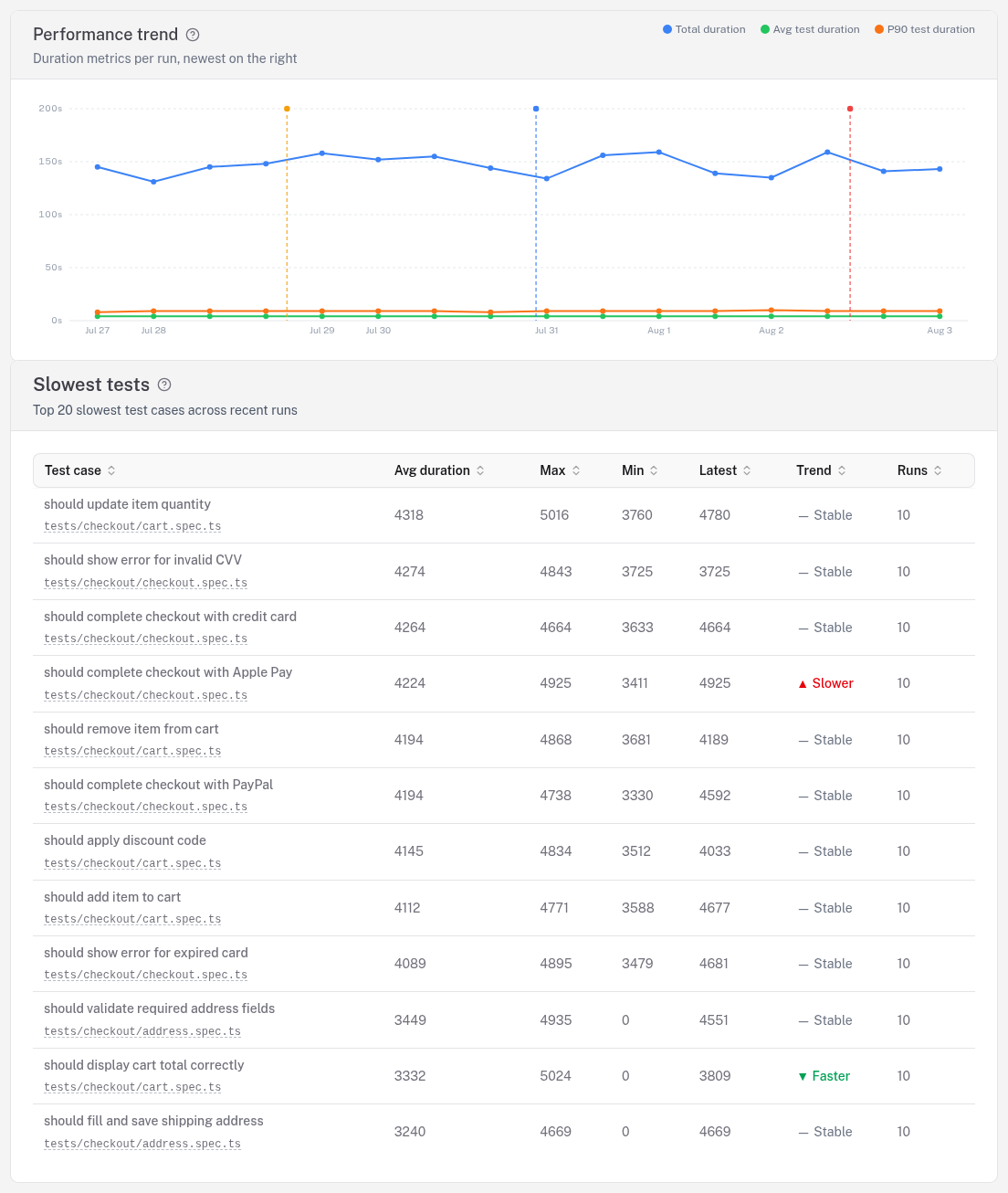
- Duration trends — average and P90 over time, so a few slow outliers don't hide a real regression.
- Slowest tests — the top offenders ranked by duration.
- Timeout opportunities — tests whose configured per-test timeout dwarfs their real p95 duration (so a hang or failure waits far longer than necessary), plus tests still carrying a stale
test.slow()mark they no longer need. Each row suggests a tighter timeout (or removing the mark) and the time reclaimable per failing run, ranked by impact. This relies on the per-test timeout the reporter captures; runs reported before that shipped still surface staletest.slow()marks from annotations + durations alone. Thresholds are tunable viaPUT /api/settings/timeout-hygiene. - Run comparison — a side-by-side delta of two runs with improved / regressed / unchanged summaries.
- Network analysis — slow API calls grouped by method and normalized route (e.g.
/api/users/:id). - Browser Web Vitals — TTFB, DOMContentLoaded, FCP and more, with color-coded thresholds.
Network analysis and Web Vitals require the capture fixtures in your test setup.
Spec health heatmap
A project-level overview groups test cases by spec file and colors each by pass rate, so an unhealthy area of the suite jumps out. Cells link straight to the filtered test-case list.
Across every project
Everything above is scoped to one project. The Analytics page lifts the same signals to your whole portfolio over a time window you choose — portfolio health, a pass-rate heatmap, wasted CI minutes, regression velocity, a global flaky leaderboard, and an auto-generated insights feed. See Analytics.
See also
- Analytics — the same signals across every project
- UI overview — where each of these views lives in the dashboard
- Reporter — how retries, traces, and run metadata get captured
- Capture fixtures — the test-side setup behind network analysis and Web Vitals
- AI diagnosis & failure clustering — explain the failures behind the trends