A locator broke after a UI change — what should I use instead?
Someone renamed a button, moved a data-testid, or wrapped a row in one more div, and a handful of tests now fail on locator.click: Timeout … waiting for getByRole('button', { name: 'Save' }). The fix is rarely hard; finding a replacement that won't break again next sprint is the actual work.
Piwi captures what the element looked like on the last run where the test passed, so the replacement is proposed from a page that worked rather than from the broken one in front of you.
1. Open the failing execution's alternative locators
On a failing test case, the Alternative locators panel lists candidate replacements ranked by stability, with one marked as the recommended fix.
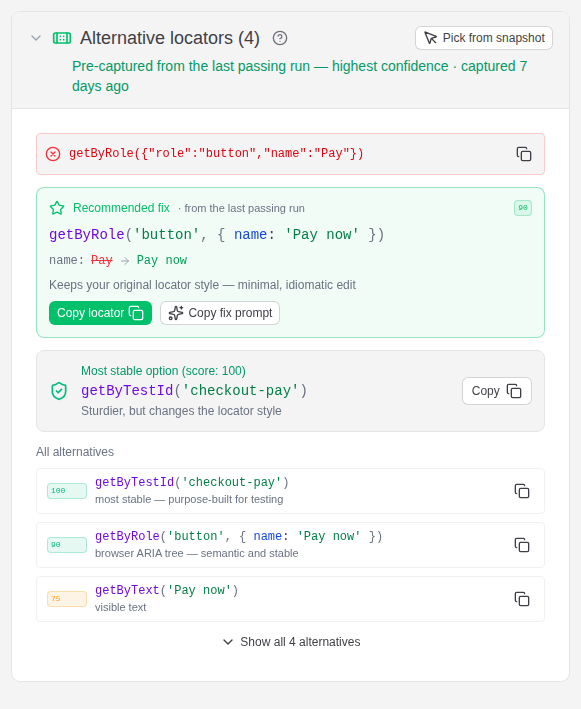
The ranking prefers what Playwright itself prefers — role and test-id over structural CSS — and leans toward the style your existing specs already use, so the suggestion doesn't drag a second convention into the codebase.
2. Jump to the line and change it
Every source path in the dashboard is clickable, including the failing call stack. Hover the path and use open in IDE to land on the exact line. That mapping is configured per browser and stored locally — your checkout path is never sent to the server.
No IDE integration set up? The path and line number are plain text on the page; the fastest route is usually copying them.
Shortcut: if it broke on your machine, fix it before the browser closes
Everything above assumes the failure is already in the dashboard. When you're running locally, there's a faster path — pause on the failing page and pick the replacement from the live DOM, while the app is still in the state that broke it.
Two reporter options, both off by default:
| Option | Env var | Opens |
|---|---|---|
pickLocatorOnFailure | PIWI_PICK_LOCATOR_ON_FAIL | the picker, aimed at the locator that just broke |
inspectOnFailure | PIWI_INSPECT_ON_FAIL | the same overlay, but free to inspect any element on the page |
['@piwitests/reporter', {
  serverUrl: 'http://localhost:3000',
  projectName: 'my-project',
  pickLocatorOnFailure: true,
}]
The run pauses with the failing page still open — the test timeout is lifted while the overlay is up — and you click the element you meant. Piwi generates ranked, uniqueness-checked candidates, and the one you confirm is recorded as a pick: it comes back in the dashboard with a Your pick badge and becomes the recommended fix. It works for a broken action (.click(), .fill()) and for a failed assertion (expect(locator).toBeVisible()), reading the locator from Playwright's own error in the latter case.
This is Piwi's own overlay, not Playwright's inspector, which is why what you confirm flows back into the healing data instead of just into your clipboard.
Worth knowing before you switch it on:
- It needs a headed browser (
--headed, orheadless: false), and it never activates under CI — anyCIenv var disables it. - With retries configured it only opens on the final attempt, and it skips expected failures (
test.fail()). - Because the run waits while the overlay is open, use
--workers=1or your other workers sit idle. - It never rewrites your test. It records the choice; applying it is still your edit.
Requirements, honestly
Locator healing needs the capture fixtures in your test setup. The reporter alone uploads results without touching your test code, but it cannot see the DOM — the ranked alternatives come from locator snapshots the fixtures record while the test runs.
It is one file:
// tests/fixtures.ts
import { test as base } from '@playwright/test'
import { extendPiwiFixtures } from '@piwitests/reporter'

export const test = extendPiwiFixtures(base)
export { expect } from '@playwright/test'
Import test from that file in your specs. A spec that still imports from @playwright/test directly runs and reports fine — it just isn't captured.
Snapshots are only recorded going forward, so the first healing suggestions appear once a passing run has been captured with the fixtures in place.
If you can't add the fixtures
Some suites can't take the code change — a vendored test pack, a repo you don't own, a migration you don't want mid-release. Four routes that don't need it:
Pick from the trace, after the fact. When the failing execution has an uploaded trace, the alternative-locators panel offers Pick from trace: it opens the trace in the dashboard's bundled trace viewer, whose Pick locator tool works on the recorded page snapshots. So a CI failure nobody watched live can still be picked visually, days later, from the page as it actually was.
Pick against the live page. The browser extension scores locators with the same engine the dashboard uses, directly on the page you're looking at. Picking and recording are fully standalone — nothing is sent anywhere, and it works without a Piwi instance at all. The cost: one click from the Chrome Web Store, which is also how you install it in Edge.
Read the failure evidence you already have. Without fixtures you still get the trace, the screenshot, and the failing call stack. Playwright's trace viewer is bundled and served by your own instance — the DOM snapshot at the moment of failure usually shows what the element became.
Ask your agent. get_locator_healing over the MCP server returns the recommended fix and the full alternatives list for a failing case, so a coding agent can apply it without you opening the dashboard. This one does still depend on captured snapshots — it reads the same data the panel does.
See also
- Capture fixtures — everything else the fixtures unlock
- Reporter — configuration and how the scoring works
- Reporter → Inspect the failing page live — the full reference for the pause-on-failure options
- Browser extension — picking and recording locators against a live page