Piwi Dashboard reporter
The @piwitests/reporter package is a custom Playwright reporter that automatically uploads test results, HTML reports, and trace files to the dashboard after each run.
Installation
npm install --save-dev @piwitests/reporterOr let npx @piwitests/reporter init do the install and wiring for you — see the one-command setup in Getting started. The rest of this page is the full manual reference.
Basic configuration
Add the reporter to your playwright.config.ts:
import { defineConfig } from '@playwright/test'

export default defineConfig({
  reporter: [
    ['list'],
    ['@piwitests/reporter', {
      serverUrl: 'http://localhost:3000',
      projectName: 'my-project',
    }],
  ],
  use: {
    trace: 'retain-on-failure',
    video: 'retain-on-failure',
  },
})
Capture fixtures
The reporter works without any test-code changes, but adding the capture fixtures to your test setup unlocks the dashboard's richest features — network timing and the Slow API endpoints table, browser Web Vitals, console capture, failure-time ARIA snapshots, and locator healing. See the capture fixtures guide for the full with/without feature matrix, composition patterns, and troubleshooting.
Option A – extend your existing fixtures:
// tests/fixtures.ts
import { test as base, expect } from '@playwright/test'
import { piwiFixtures } from '@piwitests/reporter'

export const test = base.extend(piwiFixtures)
export { expect }
Then import test from your fixture file in every test:
import { test, expect } from './fixtures'

test('homepage loads', async ({ page }) => {
  await page.goto('/')
  // network requests & web vitals are captured automatically
})
Option B – one-line extend with extendPiwiFixtures:
import { test as base } from '@playwright/test'
import { extendPiwiFixtures } from '@piwitests/reporter'

export const test = extendPiwiFixtures(base)
export { expect } from '@playwright/test'
What gets captured
- Network requests — method, URL, status code, duration, resource type. Aggregated on the dashboard into a Slow API endpoints table grouped by
METHOD + normalized route(e.g./api/users/:id). - Console entries —
warning,error, andassertmessages with their source location, shown on the test case page and included in the AI diagnosis evidence. - Browser Web Vitals — TTFB, DOM Interactive, DOMContentLoaded, Load Complete, First Paint, First Contentful Paint, plus Core Web Vitals (LCP, CLS, INP) — displayed with color-coded thresholds. LCP/CLS/INP come from buffered
PerformanceObserverentries and are Chromium-only; INP needs at least one interaction, so it is oftenn/ain short tests. - ARIA snapshot — Captured automatically on failed/timed-out tests via
page.locator(':root').ariaSnapshot(). Included in both the debug prompt (/test-cases/:id) and the cluster AI diagnosis context. - Locator snapshots — For each element a test proves resolvable — every successful action (click, fill, etc.) and every passing web-first assertion (
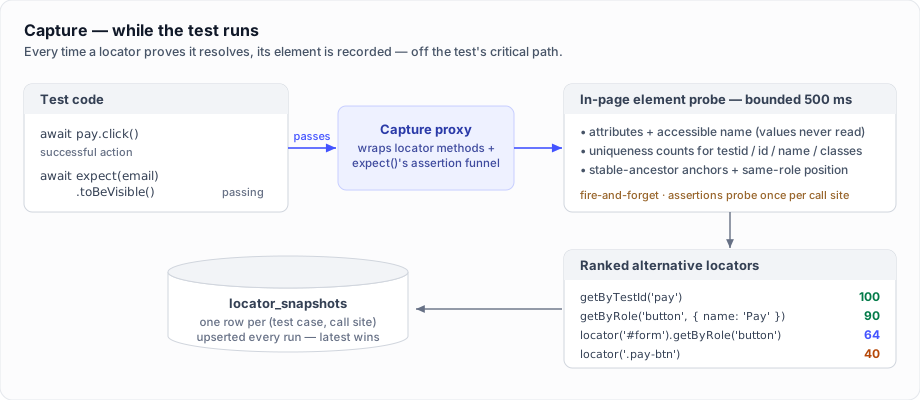
expect(locator).toBeVisible(),toHaveText(), …) — the fixtures record the element's attributes and a ranked list of alternative locators, stamped with the call site. These power locator healing when a locator later breaks. Gated bycaptureLocators(default on).
These are only collected when collectPerformanceMetrics is true (the default). If fixture data does not appear in the dashboard, the most likely cause is that your test files import test from @playwright/test directly instead of from your fixtures file (see options A/B above).
Any attachments Playwright records — including videos (video: 'retain-on-failure') and screenshots — are uploaded automatically and shown as first-class evidence on the test-case and failure-cluster pages, alongside traces. Videos can be large, so pair retain-on-failure with periodic storage cleanup.
Configuration options
| Option | Type | Default | Description |
|---|---|---|---|
enabled | boolean | true when serverUrl is set | Explicitly turn the reporter off without removing it from the config |
serverUrl | string | 'http://localhost:3000' | URL of the Piwi Dashboard server |
projectName | string | 'default-project' | Name of the project to report results under |
uploadTraces | boolean | true | Upload trace files to the dashboard |
uploadReport | boolean | true | Upload the Playwright HTML report |
reports | array | — | Additional report types to upload (see Multiple reports) |
streaming | boolean | true | Enable live streaming of results (falls back to batch if unsupported) |
streamingBatchSize | number | 5 | Number of test results to batch before sending |
streamingBatchDelay | number | 2000 | Max delay (ms) before flushing pending events |
liveFileUploads | boolean | true | Upload each test's trace and attachments as soon as the test finishes (streaming mode only) |
failOnFlakyTests | boolean | false | Fail the run when any test was flaky (passed only after a retry). Forwarded to Playwright's native failOnFlakyTests option (Playwright 1.52+) when installed via wrapConfig, so a flaky-only run exits non-zero locally, with no server round-trip |
projectDescription | string | — | Description of the project |
environment | string | — | Deployment environment for this run, e.g. "production", "staging", "integration" |
label | string | — | Display label for this run, e.g. "v2.3.1 release" |
relatedIssue | string | — | Related issue reference, e.g. "JIRA-123" |
ciInfo | string | — | CI job information |
tags | string[] | — | Tags to categorize the test run |
customData | object | — | Additional custom metadata as key-value pairs |
collectScmInfo | boolean | true | Auto-collect git commit, branch, author |
collectCiInfo | boolean | true | Auto-collect CI environment info |
collectPerformanceMetrics | boolean | true | Collect step timings, network requests and web vitals |
captureLocators | boolean | true | Capture element snapshots from successful actions and passing assertions — these power locator healing. Auto-disabled when collectPerformanceMetrics is false |
capturePageState | boolean | true | Record the page's state at test end: URL, history state, storage key names and value lengths, cookie names and flags. Values are never captured. Auto-disabled when collectPerformanceMetrics is false |
captureServerTraces | boolean | true | Read server-side spans from the X-Piwi-Trace response header emitted by a Piwi instrumentation plugin, and show them next to the network request. Free when no instrumentation is present. Auto-disabled when collectPerformanceMetrics is false |
inspectOnFailure | boolean | false | Open Piwi's own inspector overlay on the failing page after a local headed failure — inspect any element and pick a locator for it (see Inspect the failing page live). Never activates under CI |
pickLocatorOnFailure | boolean | false | Open Piwi's locator picker on the failing page after a local headed locator failure (see Pick a replacement locator). Never activates under CI |
username | string | — | Username for dashboard login (use apiKey instead when possible) |
password | string | — | Password for dashboard login (used with username) |
apiKey | string | — | API key for authentication (preferred over username/password for CI) |
runLabel | string | auto-detected from CI | Stable label tying shards together (e.g. CI run ID). Auto-detected from CI env; override if needed |
outputFile | string | — | Write a JSON file with the submitted run's dashboard URL, id, project id and status, for a later CI step to consume (see CI → Getting the run URL back out) |
verbose | boolean | false | Enable verbose logging for debugging |
Environment variables
Every option above can also be set via a PIWI_* environment variable. Env vars are fallbacks — an option passed in the reporter config takes precedence. The one exception is PIWI_VERBOSE, which wins over both the default and an explicit option (useful for toggling debug output without editing the config). The mapping is centralized in src/internal/config/env.ts (PIWI_ENV_KEYS):
| Env var | Option | Format |
|---|---|---|
PIWI_DASHBOARD_URL | serverUrl | string |
PIWI_PROJECT_NAME | projectName | string |
PIWI_API_KEY | apiKey | string (pd_…) |
PIWI_USERNAME | username | string |
PIWI_PASSWORD | password | string |
PIWI_ENVIRONMENT | environment | string |
PIWI_LABEL | label | string |
PIWI_RUN_LABEL | runLabel | string |
PIWI_STREAMING | streaming | true/false |
PIWI_STREAMING_BATCH_SIZE | streamingBatchSize | number |
PIWI_STREAMING_BATCH_DELAY | streamingBatchDelay | number |
PIWI_LIVE_FILE_UPLOADS | liveFileUploads | true/false |
PIWI_FAIL_ON_FLAKY_TESTS | failOnFlakyTests | true/false |
PIWI_UPLOAD_TRACES | uploadTraces | true/false |
PIWI_UPLOAD_REPORT | uploadReport | true/false |
PIWI_CAPTURE_LOCATORS | captureLocators | true/false |
PIWI_CAPTURE_PAGE_STATE | capturePageState | true/false |
PIWI_CAPTURE_SERVER_TRACES | captureServerTraces | true/false |
PIWI_OUTPUT_FILE | outputFile | string (path) |
PIWI_INSPECT_ON_FAIL | inspectOnFailure | true/false |
PIWI_PICK_LOCATOR_ON_FAIL | pickLocatorOnFailure | true/false |
PIWI_VERBOSE | verbose | true/false |
wrapConfig forwards the same PIWI_* vars into the isolated global-setup process so the run registration step shares the reporter's server/auth config.
Finding the desktop app automatically
If nothing sets a server at all — no serverUrl, no apiKey, and neither PIWI_DASHBOARD_URL nor PIWI_API_KEY in the environment — the reporter looks for a running desktop app on the same machine and uploads there:
reporter: [
  ['@piwitests/reporter', { projectName: 'my-project' }],
],
While it runs, the desktop app publishes its loopback URL and access token to ~/.piwi/desktop.json (%USERPROFILE%\.piwi\desktop.json on Windows), owner-readable only. It rewrites the file on every launch — the port can change — and deletes it on quit, so results only go there while the app is actually up. The reporter prints the address it picked at the start of the run.
This is the lowest precedence step, below every option and env var, and the URL and token are only ever adopted together. A project pointed at a hosted dashboard, or a CI job with PIWI_API_KEY set, is never redirected at a local app. It also means CI is unaffected: the file does not exist there. To opt out on a machine that does run the app, set enabled: false (or point serverUrl where you want the results).
PIWI_DESKTOP_CONFIG overrides the path the reporter reads.
Sharding
Playwright's --shard jobs are merged back into a single dashboard run automatically — no configuration beyond every shard using the same projectName. The runLabel option below is the manual override when your CI isn't auto-detected. Full detail, including the CI examples and how the merge works, is in CI & sharding.
Live streaming
By default, the reporter streams test results to the dashboard in real-time as tests complete. This allows you to monitor test progress live in the dashboard UI.
How it works
- When tests start, the reporter creates a run on the server with
runningstatus - As each test completes, results are sent in batches to the server
- With
liveFileUploads(the default), each test's trace and attachments are uploaded right after the test finishes, so they are viewable on the test case page while the run is still in progress - The dashboard UI shows a live progress bar and test results as they arrive
- While a test runs, the steps it is executing (Playwright
pw:apiactions,pw:expectassertions, and hook/fixture steps) stream to the run page as they happen — the "Live activity" strip shows each worker's current step. The polling attempts ofpw:assertsteps are deliberately not streamed; the persisted step events on a completed test still carry everything - When tests finish, the reporter finalizes the run with the overall status
Disabling streaming
If you prefer the original batch-only behavior (all results sent at the end):
['@piwitests/reporter', {
  serverUrl: 'http://localhost:3000',
  projectName: 'my-project',
  streaming: false,
}]
Tuning batch parameters
Control how frequently results are sent during streaming:
['@piwitests/reporter', {
  serverUrl: 'http://localhost:3000',
  projectName: 'my-project',
  streamingBatchSize: 10,     // send every 10 tests
  streamingBatchDelay: 5000,  // or every 5 seconds
}]
Backward compatibility
- If the server doesn't support streaming (e.g. older version), the reporter automatically falls back to batch mode
- The existing
submitanduploadendpoints continue to work unchanged
Global setup phase
By default a run appears on the dashboard as soon as the first test starts. If your Playwright config has a globalSetup step (seeding a database, authenticating, building the app under test, etc.), you can register the run before globalSetup runs so the dashboard shows an animated initializing state during setup.
Wrap your config's globalSetup with createGlobalSetup, passing the same options you give the reporter:
// playwright.config.ts
import { defineConfig } from '@playwright/test'
import { createGlobalSetup } from '@piwitests/reporter'

const dashboard = {
  serverUrl: 'http://localhost:3000',
  projectName: 'my-project',
  apiKey: process.env.PIWI_API_KEY,
}

export default defineConfig({
  globalSetup: createGlobalSetup(dashboard),
  reporter: [
    ['list'],
    ['@piwitests/reporter', dashboard],
  ],
})
To keep an existing globalSetup, pass it as the second argument — it runs after the run is registered:
globalSetup: createGlobalSetup(dashboard, async (config) => {
  // your existing setup logic
}),
Registration is best-effort: if the server is unreachable the error is non-fatal and the reporter simply creates the run normally once tests begin.
In Playwright's UI mode (playwright test --ui) registration is skipped entirely. UI mode keeps one long-lived process and re-runs globalSetup every time you press play, but swaps the reporter out for its own internal one — so a run registered from globalSetup would never be finished, leaving orphaned "initializing" runs (one at launch, one per manual run). A chained userSetup still runs, so your own setup logic is unaffected.
Multiple reports
Attach multiple report types to a single test run. Each report appears as a separate button in the dashboard UI.
export default defineConfig({
  reporter: [
    ['list'],
    ['@playwright/test/reporter-html', { outputFolder: 'playwright-report' }],
    ['monocart-reporter', { name: 'My Tests', outputFile: 'monocart-report/index.html' }],
    ['blob'],
    ['@piwitests/reporter', {
      serverUrl: 'http://localhost:3000',
      projectName: 'my-project',
      reports: [
        { type: 'html' },
        { type: 'monocart' },
        { type: 'blob', dir: 'blob-report', label: 'Blob archive' },
      ],
    }],
  ],
})
Built-in report types with auto-detected directories:
| Type | Default directory | Behavior in UI |
|---|---|---|
html | playwright-report/ | Opens in new tab |
monocart | monocart-report/ | Opens in new tab |
blob | blob-report/ | Downloaded as archive |
Any other type is also accepted; the directory must be provided via dir.
Locator healing
When a locator stops matching — a button was renamed, an element moved, a hashed class changed — Piwi suggests concrete, ranked replacements instead of leaving you to guess.
While tests run, the capture fixtures wrap Playwright's locator methods (getByRole, getByTestId, locator, …) and, after each successful action or passing web-first assertion (a passing expect(locator).toBeVisible() proves the element resolved just as a click does — so locators that are only ever asserted build healing history too), record the target element's attributes plus a list of alternative locators ranked by a stability score (data-testid = 100, role + accessible name ≈ 90, semantic CSS ≈ 35–40, hash-suffixed ≈ 10). Alongside the name-based alternatives, capture also generates structural, rename-proof ones — locators scoped to a stable ancestor (getByTestId('signup-form').getByRole('textbox') ≈ 72, locator('#sidebar').getByRole('link') ≈ 64, a document-unique landmark such as getByRole('navigation').getByRole('link') ≈ 55) and a name-free getByRole (≈ 58) when the element is the only one of its role on the page, or the only heading at its level (getByRole('heading', { level: 1 })). These keep working when a label or title changes, which breaks every name-derived locator at once. Heading locators carry their level, and the element's position among same-role elements is stored so a fully renamed element can still be re-identified on the failing page. Each candidate selector is probed against the live page for uniqueness — alternatives that would match several elements (strict-mode violations) are dropped at capture time. Live input values are never captured, so filled-in secrets can't leak into snapshots. One row per call site is upserted into the locator_snapshots table, so the latest known-good snapshot for every locator is always available.
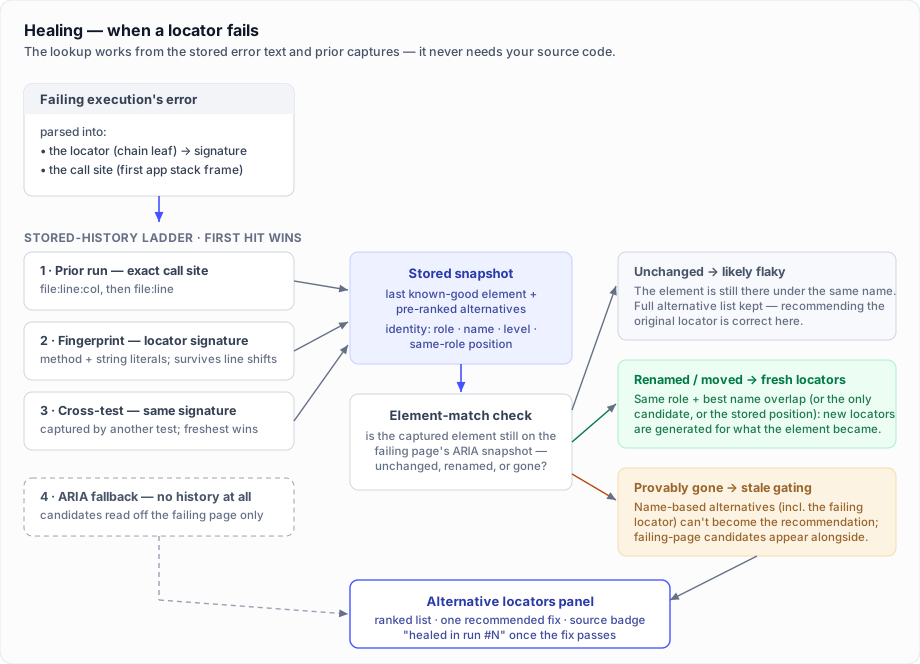
When a locator later fails, the server resolves replacements through a ladder, most-trustworthy first:
- Prior run — the exact call site (
file:line:col) had a passing snapshot; its pre-captured alternatives are reused. - Element match — the old element appears renamed or moved (its identity is gone from the failing page's ARIA snapshot), so fresh locators are generated for the element it most likely became. The match narrows heading candidates by
leveland, on a total rename with no shared words, falls back to the element's captured position among same-role elements (only when the same-role count is unchanged). - Fingerprint — the call site shifted lines, but a locator-signature match finds the prior snapshot anyway.
- Cross-test — the same locator was captured by another test in the project (useful when the failing test has no capture history of its own for that locator — e.g. it fails on its very first run, or the history predates assertion capture); the freshest snapshot is reused.
- ARIA fallback — no prior snapshot exists; limited suggestions are derived from the failure-time ARIA snapshot (no HTML attributes).
When a stored snapshot is found but the element's captured accessible name is provably gone from the failing page (and no rename match was confident), the panel flags the list: name-based alternatives — including the failing locator itself — are kept visible but excluded from the recommendation, and candidates parsed from the failing page are shown alongside. This prevents the panel from "recommending" the very locator that just broke after a label or title change.
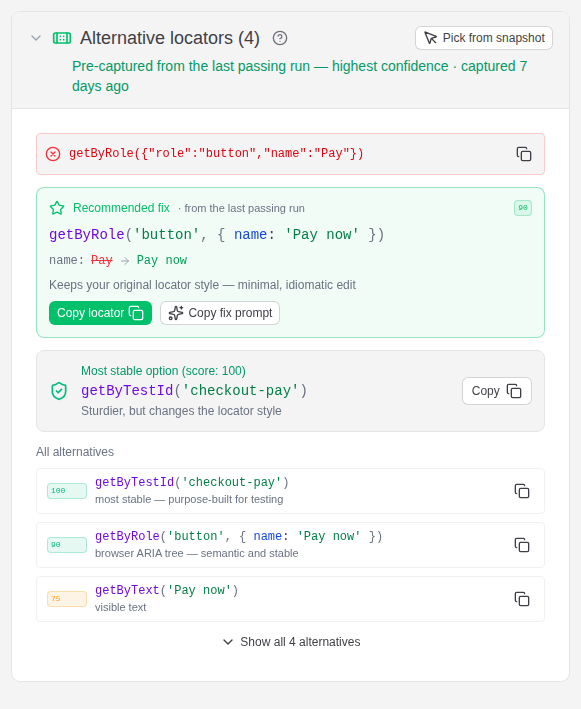
The result is shown as an Alternative locators panel on the test-case and failure-cluster pages, and folded into the AI diagnosis context so the model recommends a grounded fix (see AI diagnosis). A single recommended fix is highlighted — it keeps your original locator style where that style is stable enough (a minimal, idiomatic edit), and escalates to the sturdiest alternative (or advises adding a data-testid) only when the original style has nothing stable to fall back on.
When the failing execution has an uploaded trace, the panel offers Pick from trace: it opens the trace in the dashboard's bundled trace viewer, whose Pick locator tool works on the recorded page snapshots — so a replacement locator can be picked visually even for a CI failure nobody watched live. A replacement confirmed with the reporter's failure-time locator picker (pickLocatorOnFailure) shows a Your pick badge and becomes the recommended fix.
Capture adds a small cost in the test worker: one DOM read per call site, plus an ARIA snapshot only when the element's own attributes don't already settle its accessible name. Actions and passing assertions alike probe at most once per call site per test — a line re-run in a loop, a toPass() block, or a page-object method called repeatedly never probes twice. Negated assertions (.not.…), absence checks (toBeHidden, toBeDetached) and multi-element checks (toHaveCount, array forms) are never probed. Turn it off with captureLocators: false or PIWI_CAPTURE_LOCATORS=false; it is also disabled automatically whenever collectPerformanceMetrics is false.
Healing is read-only — it never rewrites your test. It surfaces the replacement so you can apply it yourself.
Inspect the failing page live (local runs)
When a locator breaks while you're developing locally, the fastest fix is often to just look at the page. With inspectOnFailure: true (or PIWI_INSPECT_ON_FAIL=true), a failing test opens Piwi's own inspector overlay on its still-open page right before the browser would close — click any element to generate ranked, uniqueness-checked locators for it (with the same guided parent-anchoring described below), confirm one, and it's recorded just like a pick. This is Piwi's own overlay, not Playwright's native inspector, so anything you confirm flows back into the dashboard's healing data.
# Linux / macOS
PIWI_INSPECT_ON_FAIL=true npx playwright test --headed

# Windows (PowerShell)
$env:PIWI_INSPECT_ON_FAIL='true'; npx playwright test --headed
inspectOnFailure opens the overlay on any failure so you can inspect the whole page; pickLocatorOnFailure (below) opens the same overlay but targeted at the locator that broke. Both are local debugging aids and deliberately conservative: they require a headed browser (--headed / headless: false), never activate under CI (any CI env var), skip expected failures (test.fail()), and with retries configured only open on the final attempt. While the overlay is open the run waits (the test timeout is lifted), so prefer --workers=1 when enabling it.
Pick a replacement locator on the failing page (local runs)
One step beyond inspection: with pickLocatorOnFailure: true (or PIWI_PICK_LOCATOR_ON_FAIL=true), a test that failed on a locator gets Piwi's own picker injected into the still-open page — whether the failure was a locator action (.click(), .fill(), …) or an assertion (expect(locator).toBeVisible()). For an action, the broken locator and its call site come from the captured failure; for an assertion, they're read from Playwright's error (Locator: line + call site). The flow is guided, in three steps (Esc skips at any point):
- Pick the element. Hovering highlights; the pick snaps to the nearest actionable ancestor (clicking the
<span>inside a button picks the button), and ↑/↓ walk the DOM tree up/down before you click — the locator for the element under the cursor is shown in a chip pinned to it and again on its own line in the banner, so each step of the walk shows what it would produce. - Bless stable parents (optional). The element's ancestors are listed with their strongest hook (
data-testid,#id, labeled landmark, role). Select one or more to scope the locator to — hovering a row outlines that parent in the page and names it in a chip pinned to it, and a live "matches N" count is recomputed against the real failing page on every toggle (exactly 1 = green). Selected parents produce anchor-scoped chains likegetByTestId('signup-form').getByRole('button')— the rename-proof style — and picking several adds a combined chain when it isolates exactly one element. - Confirm. The ranked, uniqueness-checked candidates (standard generation merged with your anchor-scoped chains) are listed; pick one to confirm it.
# Linux / macOS
PIWI_PICK_LOCATOR_ON_FAIL=true npx playwright test --headed

# Windows (PowerShell)
$env:PIWI_PICK_LOCATOR_ON_FAIL='true'; npx playwright test --headed
A confirmed pick is recorded in three places:
- The run's locator snapshots — the pick is folded into the failing call site's snapshot (flagged
pickedByUser, listed first), so after the run uploads, the Alternative locators panel for that failure shows your confirmed choice at the top. - A
piwi-user-pickattachment and a report annotation, so the choice is visible in the Playwright report and trace. - The terminal, with the failing call site (
file:line:col) and the replacement, ready to paste into the test.
The gate is identical to inspectOnFailure (headed browser, never under CI, final attempt only), and the picker suppresses the page's own click handlers while active, so picking can't navigate or mutate the failing page. Picking never rewrites your test — it records the choice so you (or the dashboard) can apply it.
Automatic metadata collection
SCM information (Git)
When collectScmInfo is enabled (default), the reporter collects:
- Commit hash and message
- Branch name
- Author name
- Remote URL
CI information
When collectCiInfo is enabled (default), the reporter auto-detects:
| Platform | Collected fields |
|---|---|
| GitHub Actions | Run ID, run number, workflow, actor, repository, ref, SHA |
| Jenkins | Build number, build URL, job name |
| GitLab CI | Pipeline ID, pipeline URL, job ID, job URL, job name |
| CircleCI | Build number, build URL, job name, workflow |
| Travis CI | Build number, build URL, job number |
| Azure Pipelines | Build number, build ID, build URL, job name |
Playwright configuration
The reporter also records browser project configs, worker count, test timeout, and parallel settings.
Browser configuration per test case
The reporter automatically captures each test case's Playwright project configuration — projectName, browserName, channel, and viewport — via test.parent.project(). This is stored in the browser field of every test case result.
In the dashboard UI, the test run detail page shows a browser icon and project name as the first column of the test cases table, and you can filter by browser using the dropdown above the table.
Suite hierarchy (describe blocks)
The reporter traverses the test's parent chain (test.parent) to build a suitePath array — the list of describe-block names from the root to the test's immediate parent. Each level's suiteConfig (mode: parallel | serial | default, plus any suite-level annotations) is captured alongside the path. This data is sent in both streaming and batch submission payloads and stored in the test_suites and test_cases tables.
In the dashboard UI, the test run detail page offers a Tree view that groups test cases by their suite hierarchy, with expandable/collapsible describe nodes showing mode badges and annotation counts.
Test annotations (Playwright marks)
The reporter captures Playwright test marks set via test.info().annotations (e.g. @fixme, @slow, @skip) and sends them as testAnnotations in every test case payload. These are stored per-run on the test_runs_cases table and rendered as badges on the test case row and test case detail page. A @slow mark combined with a test's duration history powers the stale test.slow() detection in Timeout opportunities.
Test tags
The reporter reads each test's tags (TestCase.tags) and sends them as tags. Playwright already folds together both ways of declaring one, so either works:
test('checkout applies the discount @smoke', async ({ page }) => { /* … */ })

test('checkout applies the discount', { tag: ['@smoke', '@critical'] }, async ({ page }) => { /* … */ })
Tags are stored twice: on the execution (test_runs_cases.tags, what that run saw) and on the test case (test_cases.tags, the latest declaration). The leading @ is stripped on the way in, so a tag reads the same however it was written — filter for smoke or @smoke and you get the same rows. Removing a tag from a spec clears it on the next run that reports the test.
Tags drive the tag filter on a project's Test cases tab, the same filter on the flaky leaderboard, and the requireTags rule of the CI gate.
Ownership metadata (piwi: annotations)
Four piwi:-prefixed annotations attach ownership to a test. They are ordinary Playwright annotations, so no new API is involved:
test(
  'checkout applies the discount',
  {
    tag: '@critical',
    annotation: [
      { type: 'piwi:owner', description: '@checkout-team' },
      { type: 'piwi:priority', description: 'critical' },
      { type: 'piwi:feature', description: 'Checkout' },
      { type: 'piwi:link', description: 'https://issues.example.com/PROJ-412' },
    ],
  },
  async ({ page }) => {
    /* … */
  },
)| Field | Accepts |
|---|---|
piwi:owner | Any text — a team handle, a squad name, an email |
piwi:priority | critical, high, medium or low (anything else is ignored) |
piwi:feature | Any text — the product area, for grouping across spec files |
piwi:link | An absolute http(s) URL; other schemes are dropped rather than stored |
Metadata shows as badges next to the test wherever it is listed, is filterable by owner and priority on the Test cases tab, and is carried into pull-request feedback so a failure comment names the team that owns it. Unknown piwi: fields and unparseable values are ignored — a typo costs you the field, not the run.
The values are also re-validated server-side, because a payload can reach the ingest API without passing through the reporter.
Per-test timeout
The reporter records each test's effective per-test timeout (TestCase.timeout) and sends it as timeout (milliseconds) on every test case payload, stored on test_runs_cases.timeout. 0 means the test has no timeout (unbounded); runs reported by an older reporter that predates this field store null.
Together with the test's duration history this drives the Timeout opportunities analysis (see Performance), which flags tests whose timeout far exceeds their real p95 duration so failures and hangs stop wasting time waiting.
Skipped vs "didn't run"
The reporter distinguishes two outcomes that Playwright both reports as skipped:
skipped— an intentional skip viatest.skip()/test.fixme()(static, conditional, or runtime). These always carry askip/fixmeannotation, so the skip reason (when provided) is preserved intestAnnotationsand shown on the test case.didnotrun— a test that never actually executed. This covers two cases:- a test skipped as a side effect of an earlier failure in a
describe.serialgroup (Playwright reports it asskippedwith no annotation; the reporter reclassifies it); - a test that Playwright never started because the run was cut short (no
onTestEndfires for these — the reporter materializes them from the planned test list so they still appear, with zero duration and no error).
- a test skipped as a side effect of an earlier failure in a
Each didnotrun case also carries didNotRunReason, so the dashboard can say why a test never ran rather than just that it didn't:
previous-failure— skipped because an earlier test (or hook) in its serial group failed. The reporter also recordsblockedBy, the location of the failing test that blocked it — so the did-not-run case links to its cause, and the failing test lists the downstream tests it stopped from running.global-timeout— the run'sglobalTimeoutelapsed before the test could start.max-failures— the run reached its configuredmaxFailuresbudget.interrupted— the run was otherwise cut short (a worker crash or a cancellation).
The run-level counter didNotRunTests aggregates these, and the dashboard renders them as a distinct "Didn't run" segment/badge separate from skipped.
With custom metadata
export default defineConfig({
  reporter: [
    ['@piwitests/reporter', {
      serverUrl: 'http://localhost:3000',
      projectName: 'my-project',
      projectDescription: 'End-to-end tests for the main application',
      environment: 'staging',
      relatedIssue: 'PROJ-123',
      tags: ['regression', 'critical'],
      customData: {
        version: '1.2.3',
      },
    }],
  ],
})
Disabling automatic collection
export default defineConfig({
  reporter: [
    ['@piwitests/reporter', {
      serverUrl: 'http://localhost:3000',
      projectName: 'my-project',
      collectScmInfo: false,
      collectCiInfo: false,
      collectPerformanceMetrics: false,
    }],
  ],
})
How it works
- The reporter collects test results during the run.
- After all tests complete, it uploads results to the dashboard.
- If
uploadReportis enabled, the entireplaywright-report/directory is compressed with gzip and uploaded. - If
uploadTracesis enabled, all trace files found in test attachments are uploaded. - If the capture fixtures are active, network requests, console entries, Web Vitals, failure-time ARIA snapshots, and locator snapshots are included per test case.
- The server decompresses the report and makes it available for viewing, with fully functional HTML reports.
Uploaded traces open in the dashboard's built-in, self-hosted trace viewer — the bytes never leave your server. See Trace viewer.
Troubleshooting
Reporter not uploading files
- Make sure an HTML reporter is configured:
['html', { outputFolder: 'playwright-report' }] - Make sure traces are enabled:
use: { trace: 'retain-on-failure' } - Check the dashboard server is running and accessible at
serverUrl
Fixture data not appearing (network, Web Vitals, console, ARIA snapshot, locator healing)
- Extend your
testwithpiwiFixtures/extendPiwiFixturesfrom@piwitests/reporter, and make sure every spec importstestfrom your fixtures file — not from@playwright/testdirectly - Verify
collectPerformanceMetricsis not set tofalse(andcaptureLocatorsfor locator healing) - Ensure tests navigate to at least one page (
await page.goto(...)) - See the capture fixtures guide for details
Connection errors
- Verify
serverUrlis correct and the server is running - Check network connectivity and firewall settings
With authentication enabled
When the dashboard has authentication enabled, the reporter must authenticate before submitting results.
Recommended: API key (preferred for CI)
Generate an API key in the dashboard UI (Settings → Users → API keys button), then configure the reporter:
export default defineConfig({
  reporter: [
    ['@piwitests/reporter', {
      serverUrl: 'http://your-dashboard.example.com',
      projectName: 'my-project',
      apiKey: process.env.PIWI_API_KEY,
    }],
  ],
})
The key is sent as an Authorization: Bearer <key> header. Store it in a CI secret — never hard-code it.
Alternative: username/password
export default defineConfig({
  reporter: [
    ['@piwitests/reporter', {
      serverUrl: 'http://your-dashboard.example.com',
      projectName: 'my-project',
      username: process.env.PIWI_USERNAME,
      password: process.env.PIWI_PASSWORD,
    }],
  ],
})
The reporter calls /api/auth/login automatically before each upload.
See Authentication for details on enabling auth, creating users, and managing API keys.